“Double click My Computer.”
For anyone who used Windows through the 1990s and 2000s, that sounds like a completely normal technical instruction. For one confused user in a classic help-desk joke, however, it raises a much bigger question:
Why is your computer on my computer?
That misunderstanding became a long-running piece of IT humor, built around Microsoft’s old My Computer desktop icon and the kind of phone support conversation that becomes more difficult with every sentence.
The joke is the inspiration behind the Double Click My Computer design.
What Is the Double Click My Computer Joke?
The joke usually begins with a help-desk technician giving a simple instruction:
“Double click on My Computer.”
The user responds that they cannot see the technician’s computer.
From there, the conversation gets increasingly frustrating. The technician explains that they mean the icon labeled My Computer on the user’s own desktop. However, the user keeps interpreting “my computer” as the technician’s physical machine.
Eventually, the user asks some version of:
“What is your computer doing on my computer?”
The entire joke comes from one perfectly reasonable Windows label becoming absurd during a spoken conversation.
Why Was It Called “My Computer”?
My Computer was a familiar part of Microsoft’s desktop interface for many years.
Windows 95 placed the icon prominently on the desktop, where users could open it to view hard drives, floppy drives, CD-ROM drives, and other system locations.
A contemporary 1995 description of Windows 95 specifically explains that the desktop displayed a My Computer icon and that users could open it to access available drives.
Therefore, telling someone to “double click My Computer” became a completely ordinary instruction for technicians helping Windows users over the phone.
The Wording Was Perfect for a Misunderstanding
Written on a screen, My Computer is clearly the name of an icon.
Spoken aloud, however, the phrase becomes ambiguous.
A technician says:
“Click My Computer.”
The user hears:
“Click my computer.”
Those sentences sound identical, even though one refers to a Windows object and the other sounds like the technician is talking about a computer sitting somewhere else.
That ambiguity is the engine behind the entire joke.
How Old Is the Joke?
The exact creator is difficult to identify because the story circulated like many early computer jokes: through email, forums, joke pages, blogs, and copied lists of help-desk stories.
Surviving online versions date back many years. A 2007 blog post already includes the familiar exchange, while a 2009 forum copy repeats almost the same wording.
By then, the joke was clearly established enough to circulate without attribution.
That makes it more accurate to treat it as a classic piece of shared tech-support humor than as a meme created by one identifiable person.
Why Tech Support Created So Many Jokes
Telephone technical support creates a unique communication problem.
The technician can describe what should be on the screen, but they often cannot see what the user is actually doing. Meanwhile, the user may not know the names of the buttons, windows, icons, or menus being described.
As a result, even simple instructions can fall apart.
“Open the browser” becomes “What’s a browser?”
“Click Start” becomes “I thought we already started.”
And, naturally, “Double click My Computer” becomes a debate about whose computer is where.
The Joke Captures Old-School PC Support
Modern remote-support tools make it much easier for technicians to see a user’s screen directly.
However, older support calls often relied almost entirely on verbal instructions.
The technician had to imagine what the user could see. The user had to translate technical language into whatever appeared in front of them.
One wrong assumption could send the entire conversation in another direction.
That is why the My Computer joke feels so familiar to people who have worked in IT. The exact conversation may be exaggerated, but the type of misunderstanding is completely believable.
What Happened to My Computer?
Microsoft eventually changed the name.
Later versions of Windows moved away from the old My Computer wording. Windows Vista and Windows 7 generally called it Computer, while modern Windows versions use This PC.
Those names are arguably clearer, especially during spoken instructions.
Still, anyone who spent enough time with Windows 95, 98, XP, or older office computers probably remembers My Computer immediately.
That gives the joke an extra layer of retro-PC nostalgia today.
Why “Double Click” Is Part of the Nostalgia Too
Double-clicking was once one of the most fundamental desktop-computer actions.
Windows users learned to single-click items to select them and double-click icons to open them.
For experienced users, that distinction became automatic. For beginners, however, it created another surprisingly common source of confusion.
People clicked too slowly, clicked too many times, used the wrong mouse button, or moved the mouse between clicks.
Therefore, even the first two words of the joke already belong to a very specific era of computer support.
The Joke Became a Perfect IT Story
Over time, variations of the conversation spread across joke sites and collections of supposed help-desk stories.
Some versions use a woman calling technical support. Others change the wording or add more frustration. In certain retellings, the user even offers to visit the technician’s office so they can physically click the technician’s computer.
However, the core joke remains unchanged.
The technician means a Windows icon.
The user thinks the technician means an actual computer.
Neither side can believe the other person is confused.
Why IT Workers Still Relate to It
Technology changes, but support conversations remain surprisingly similar.
Users still describe icons by appearance rather than name. They still confuse browsers with search engines, Wi-Fi with internet service, and websites with apps.
Meanwhile, technicians sometimes forget how much assumed knowledge hides inside apparently simple instructions.
That tension produces endless frustration, but it also produces endless humor.
The Double Click My Computer joke survives because everyone involved thinks they are being perfectly clear.
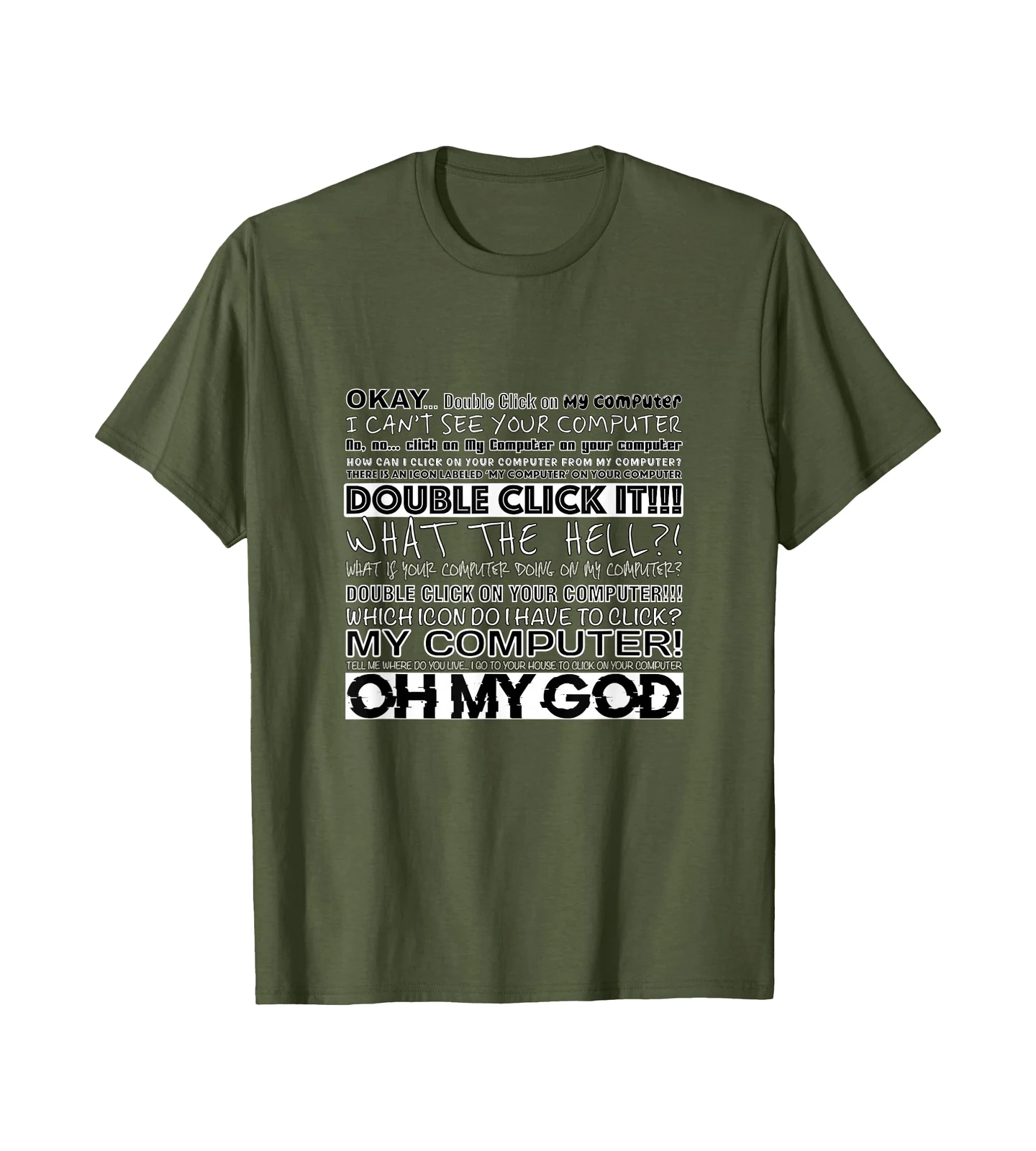
The Double Click My Computer Shirt
The Double Click My Computer shirt recreates the chaotic conversation through stacked phrases such as “I can’t see your computer,” “Double click it,” and “What the hell?!”
Instead of presenting the joke as one clean sentence, the design captures the increasing confusion of the support call itself.
That makes it a natural fit alongside AmazeShirt’s Viral Meme Designs and other references built around internet and computer culture.
Sometimes the Problem Is the Name
From Microsoft’s perspective, My Computer was a friendly name. The icon represented your computer and everything connected to it.
From the perspective of somebody receiving instructions over the phone, however, the wording created an entirely different problem.
The technician says the instruction again.
The user becomes increasingly suspicious.
And somewhere in the conversation comes the inevitable question:
What is your computer doing on my computer?